Alison Holland, EdD | Web Developer

Headshot of Alison Holland
Photo by Natalie Jennings

Hi, I’m Alison.

I'm a user interface (UI) developer with a background that spans education, public service, and marketing.

Before moving into development, I spent nearly a decade as a digital learning designer at University of Minnesota Extension, where I partnered with educators to create engaging, accessible learning experiences. I also recently served my community as a County Commissioner.

Today, at the University of Minnesota Foundation, I focus on improving the accessibility and usability of our digital tools—reflecting the values I’ve carried throughout my career: accessibility, collaboration, and solving real-world problems. My path hasn’t been linear—and that’s a strength. Working across disciplines has taught me how much different fields can learn from one another, and I bring that systems-thinking mindset to every challenge I take on.

Skills

Developer skills

  • Front-end technologies, including stateful, responsive, mobile-first design, and accessibility practices (HTML5, CSS3, JavaScript, Media Queries, Content Management Systems)
  • Back-end development, including Object-Oriented Programming (Python) and database integration (SQL, Jinja, PHP)
  • Software testing, including browser (Ghost Inspector, Marker.io, Happo) and accessibility testing (WAVE, Pope Tech, Google Lighthouse, keyboard-only navigation, VoiceOver)
  • Version control (Git, GitHub)
  • Web frameworks (React, Flask)
  • API development and integration, including CRUD operations (REST, RESTful)

Complementary skills

  • Learning design and learning management systems (Canvas, Moodle), including knowledge of UI/UX design
  • Quantitative and qualitative research, including survey design (Qualtrics), usability testing, focus groups, and data analysis and visualization
  • Plain language writing, break downing complex topics and turning jargon into plain language
  • Strategic and systems thinking, aligning technical work and daily tasks with business goals and cross-team collaboration
  • Standard office and design software (Microsoft Office, Google Suite, Canva, Slack, Figma)

Projects

Work products

Improved accessibility in legacy code

Skills
  • Conducting both automated and manual accessibility testing
  • Application of HTML, CSS, and JavaScript skills with accessible practices
  • Updating and adapting legacy code
Tools
  • PopeTech
  • WAVE
  • Ghost Inspector
  • Chrome DevTools (including Lighthouse)
  • Visual Studio Code
  • Git/GitHub
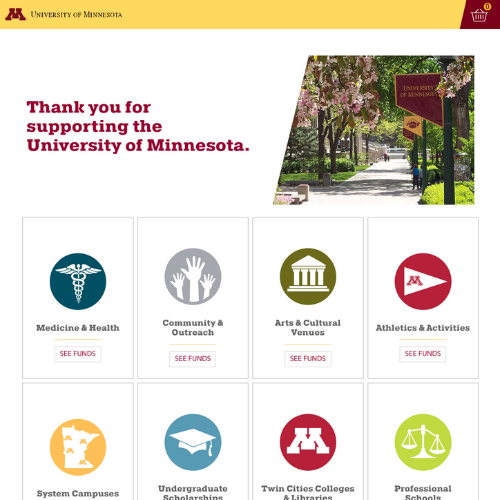
preview of the University of Minnesota's online giving tool
Description

I led the accessibility improvements for the University of Minnesota's online giving tool, boosting the automated Pope Tech score from 6.7 to a perfect 10. This was accomplished by modernizing the legacy UI to comply with WCAG standards. I conducted accessibility testing, organized issues, and implemented key enhancements, including refined keyboard navigation, ARIA implementations, and improved screen-reader support.

Work is ongoing to make this site as accessible as possible.
Developed scalable custom appeal cart pages

Skills
  • Development and utilization of Elasticsearch API
  • Application of HTML, CSS, and JavaScript skills with accessible practices
  • Working within a legacy codebase, leveraging existing jQuery design patterns
Tools
  • Elasticsearch
  • Figma
  • Chrome DevTools
  • Visual Studio Code
  • Git/GitHub
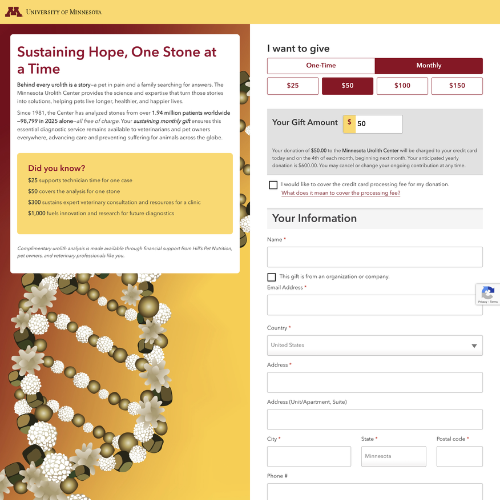
preview of the University of Minnesota's Urolith Center custom cart page
Description

I revamped custom appeal cart pages that were originally hard-coded in a beta version prior to my arrival at the organization. This involved integrating them with an Elasticsearch-backed API that I developed. I am also collaborating to implement a Quality Assurance (QA) workflow focused on enhancing scalability.

As a result, this project scaled to 10+ appeals within two weeks of rollout, representing a 150% increase from the 4-appeal beta phase that preceded the API launch.

Learning project

Co-created AI prompt builder powered by React

Skills
  • Utilization of HTML, CSS, and React.js
  • Implementation of Google Gemini API
  • Collaborative development on a remote team using agile practices, including both solo and pair programming
  • Application of accessible design practices
Tools
  • React + Vite
  • Google Gemini API
  • Netlify
  • Figma
  • Chrome DevTools
  • GitHub Repository and Projects
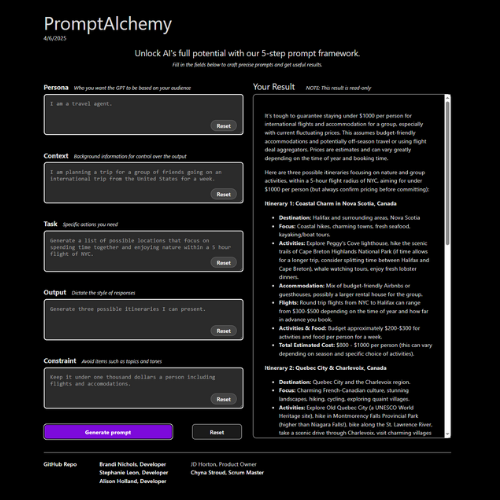
preview of PromptAlchemy app
Description

This app was created through a Chingu tier 1 voyage. As a team, we built a web application, PromptAlchemy, which lets its users become more effective at building AI prompts.

It follows a structured methodology called a Pentagram to help the user build good prompts, test them, and learn to improve on them along the way.

I led the implementation of accessibility best practices and applied design styles to ensure an intuitive and inclusive user experience.